Using Pinterest To Find Free PowerPoint Templates And Inspirational Ideas
Last updated on October 25th, 2021
Some analysts are predicting a decline in search engine traffic over the coming years. One of the major reasons for this appears to be the evolution of user habits regarding performing online searches. One aspect is that search engine searches are reducing due to searches via mobile apps, however, I believe that one of the major players that are reducing conventional search engine queries also include websites like Pinterest. Most people might agree that it is becoming increasingly hard to find quality and relevant content using conventional search engines. On the contrary, websites like Pinterest provide an easy and quickly way for finding inspirational ideas and required content (e.g. free visually appealing PowerPoint Templates).
What is Pinterest?
For those of you who are unaware of what Pinterest is, it is a pinboard style social media website where users create, share and manage their image collections, which are mostly linked to some website. For example, if you are looking for a website about cooking, you can search Pinterest and see pins from users who may have linked images from cooking related websites. Many a times people also pin content related to their personal liking or even personal images. In other words, Pinterest is like a cross between Instagram and Clipboard, which can be a good place to store your images, share website links and to collaborate with others to build an image collection regarding any topic with website links and photos (called Boards). You can also follow boards from other users and allow people to follow and "Pin" to your Boards.
Using Pinterest for finding Free PowerPoint Templates, Diagrams and Inspiration for your Presentation Slides
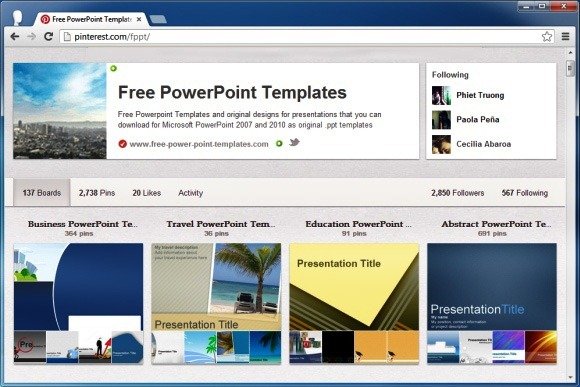
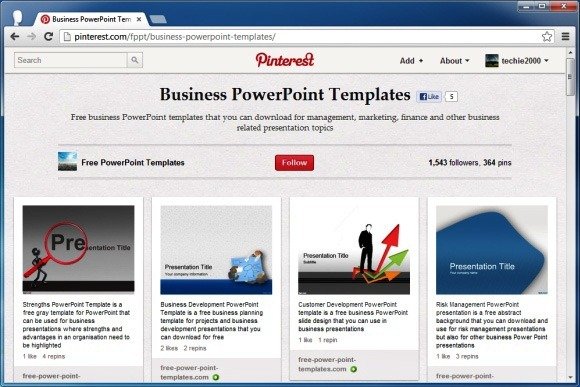
If you are looking to create a complete presentation, specific slides with diagrams or infographics for your presentations, then you can simply follow boards from people who may be maintaining them. For example, our FPPT Boards at Pinterest provide a collection of creative presentation ideas in Pinterest. You can either follow all our boards or specific ones like the Business PowerPoint Templates Board, Technology PowerPoint Templates Board, 3D PowerPoint Templates Board and others.
Moreover, if you want to share in Pinterest any existing slide from a PowerPoint presentation then there are multiple ways to accomplish it. One of these methods is first uploading your .PPT presentation to PowerPoint sharing website like Slide Online and then pinning the slides that were converted to an online version.
Getting Inspiration And Ideas Using Pinterest
Pinterest can be used for getting a lot of inspirational ideas for anything from PowerPoint presentations to renovating your house or modifying your garden! It's that diverse and rich in nature.
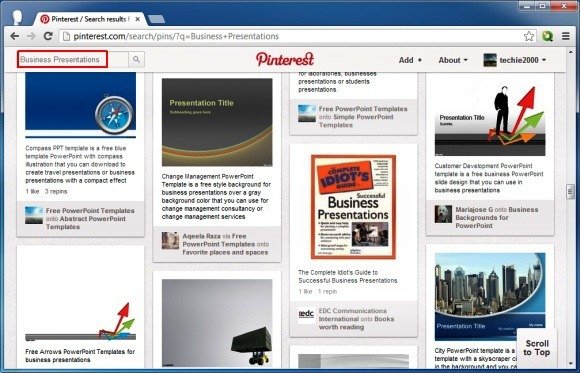
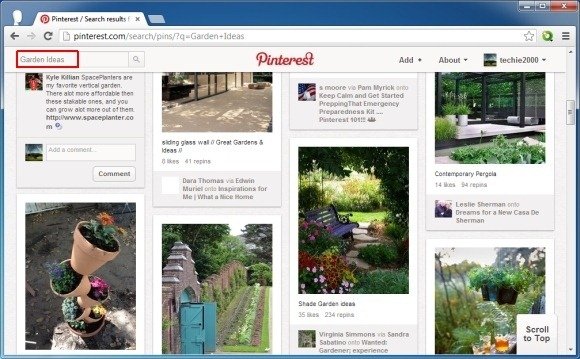
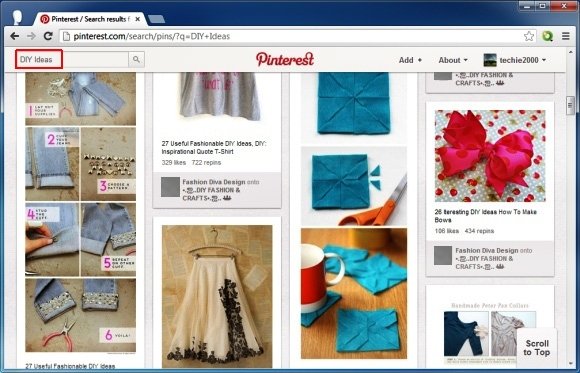
Unlike services like Instagram, users can arguably find more meaningful images related to any topic that comes to mind. You can search for a specific keyword and find Pins or Boards relevant to the topic for getting ideas related to your next project. Whether you need ideas for your school project, are about to start your own DIY project or need some quick tips for professional purposes, Pinterest has it all. The below images show how you can find inspirational ideas using Pinterest.
Alternatively to navigating Pinterest online in a web browser, you can also use a Pinterest video downloader to download the images in a Pinterest board or videos in Pinterest.
Business Presentation Ideas
Gardening Ideas
DIY Ideas
To get started with your pinboard and to look for ideas and inspiration, head over to Pinterest.
Instead of an app or gadget that claims to jump-start your productivity, this year, you should invest in a good paper planner. After all, there's plenty of research showing that actually writing down your to-do list and schedule for the day — rather than typing it out on a laptop or your iPhone — makes you feel more engaged in the task at hand. And though we've written about some of our favorite planners in the past, like this Japanese option, we wanted to find the best planners available. So we reached out to productivity experts, life coaches, and people who just love stationery and know how to get things done and asked them about their favorites. Below, the best life planners, day planners, and planners that will keep you on track in 2020.
BestSelf Co. Self Journal
Life coach Penny Zenker recommends the BestSelf Co. Self Journal because it helps break down big goals into digestible 90-day chunks. "I use this now because it is a comprehensive goal-setting-and-tracking system with reflection all-in-one. It helps me align my goals and my daily tasks, which makes me more productive." Liz Sumner, a progress and life coach, also likes the Self Journal. "The basic version has a lot of valuable material for getting started on goal-setting," she says. "I've been using it for several years, ever since I discovered it on Kickstarter. It combines the best parts of a journal and planner."
The Full Focus Planner by Michael Hyatt
Personal brand expert Richard Janes has "spent a small fortune over the years looking for a planner that can really help with keeping you focused and on task." He calls the Full Focus Planner by Michael Hyatt "the best I have found. The reason it works so well for me is that the layout provides clear focus on what is important, while still enabling me to empty my head of all the other tasks that are lurking around. But it doesn't go overboard so that I can easily get to the actual planning of my day, week, and month." One note: this planner is organized in 90-day chunks, which means you'll need to buy four to take you through 2020, but it also offers a bit more flexibility, and you can start it at any point in the year.
Day-Timer Starter Set Organizer
Day-Timer 2020 Daily-Planner Refill
Christy Whitman, a life coach and the author of The Art of Having It All: A Woman's Guide to Unlimited Abundance, has been using the Day-Timer for over 20 years. "I love this brand because the layout of the pages allows me to have a place for the items to be done today, a schedule, and also a page for writing and taking notes. So each day is on two pages and gives me a full look at my day," she says. "If I have an appointment scheduled, I can write notes next to the appointment and remind myself of call-in information, the name of the person, or any other important information." Whitman also loves Day-Timer's customer service, specifically the reminders to get new pages for the new year. "They send me an email with the order number, refill numbers, and it is just easy for busy career people."
Russell + Hazel Peony Bookcloth Mini 3 Ring Binder
Russell + Hazel 2019 / 2020 Mini Month Tabs
Darcy Miller — an author, illustrator, and crafter with a meticulously organized office — prefers using a binder-style planner, specifically this one from Minnesota-based Russell + Hazel. "I use it for my day-to-day notes and planning, and then I also have one for each of my kids, where I record things about them over the years, from teacher's conferences to doctor's appointments," she says. The 8x9-inch binder is small and light enough to fit in her bag, but when it's not in there, "it looks good if it's out on the table." She also likes the loose pages, which can be removed and rearranged if necessary.
Brepols Back to Paper 2020 Diary Notebook
"My favorite planner is the Brepols diary," says Sandeep Salter, founder of home-goods shop Picture Room in Brooklyn. This simply designed planner has helped her transition from a digital calendar user to a written one. "I was actually exclusively a Google Cal user until recently, when I flaked on a very important studio visit. Just didn't show up because it had been accidentally deleted from the Cal! I was mortified. That's what's great about a physical diary. My toddler cannot randomly delete important events at any moment. So now I use the Brepols for meetings and studio visits specifically. Dates in front, notes in back."
Kokuyo Jibun Techo 2020 Diary
Wakako Takagi, co-founder of Los Angeles–based stationery store Baum-kuchen, likes the Jibun Techo from Kokuyo. "This is my right-hand analog tool that goes everywhere with me. I use the monthly pages as a master planner, and my weekly pages to keep me oriented with detailed appointments, things to remember, as well as documentation of some of the key ingredients in life (like how many miles I run on each day to train for a marathon)." Plus, she adds, this journal's card-holder insert does double duty as her wallet. "So I just need to grab Jibun Techo and my keys and I am ready to head out!"
Milligram 2020 Non-Diary — Daily
Two Strategist staffers (myself included) have a version of this planner from the Australian stationery store Milligram. Writer Lauren Ro actually introduced it to me last year: "With a variety of abstract covers, colorways, and programs, they were the planners of my dreams. I chose the daily 'non-diary' with dot-grid pages for each day of the year." This year, she's trying the "Family Life" weekly diary, "which includes space for action lists, budgeting, meal planning, and more." But I'm going to be picking up the dotted non-diary for the second year in a row to help me keep track of The Strategist's editorial calendar. Each page has plenty of space for the day's to-do lists and notes, and it's easy to flip months ahead. It also just looks very nice sitting on a desk, and the linen wears well over the course of a year.
Smythson 2020 Soho Agenda
If you're feeling like splurging, writer Leah Bhabha likes her Smythson Soho Diary. "Larger than a pocket calendar, which affords little writing space, and smaller than a desk diary, which is like lugging around a textbook, the Soho is the ideal size," she says. She likes the formatting, too. "The weekly agenda devotes a sizable square to each day, and there's a weekly to-do list on the opposite page." Plus, the paper itself is "half the thickness and weight of normal pages, but suffice to say, they make for easy writing with no ink bleeding through."
Smythson 2020 Wafer Agenda With Pocket
For a less expensive option from Smythson, Tad Friend, a staff writer at TheNew Yorker, recommends the Wafer agenda. He's been using this planner for more than 20 years and says "the flyweightness is a clinching feature." It's small enough to fit in his back pocket, but it's still packed with information. "It reminds you when red-grouse shooting season ends, and it has the phone numbers for the 'principal clubs' of the Western world, such as Boodle's and White's in London, listed in front so you can call periodically to ask if they have a Hugh Jass waiting in the lobby." But because it's so easy to stick in his back pocket, Friend does warn that "the calendar's only weak point, as I've twice discovered, is that it doesn't do at all well in a washing machine." He uses a navy version, which seems to be out of stock. But there are still a few pastel options available.
Lemome 2020 Planner
For those who use digital calendars for scheduling appointments but still want a paper planner to help them make the best use of their time, Neha Gandhi, CEO and editor-in-chief of Girlboss, recommends her Lemome planner. Instead of writing down appointments and logistics, she outlines each day's main goal in her planner. That helps her keep focused during the day and track projects over time. "I like this particular planner because it doesn't waste real estate on huge day-by-day calendars, and instead gives only high-level monthly and note-taking weekly views. I can organize meeting notes by the day they were taken (and can then cross reference the date to the meeting the notes came from in my digital cal), so that I'm not flipping endlessly through a notebook to find one nugget of information that's somehow always just out of reach," she says. She also likes the convenient size "that neatly fits into any work bag" and that the planner "matches the notebooks I use, so everything on my desk can match."
Vox Media has affiliate partnerships. These do not influence editorial content, though Vox Media may earn commissions for products purchased via affiliate links. For more information, see our ethics policy.
Do you find yourself in plenty of Zoom or Skype calls at the moment, with nothing but a bland wall behind you? Lucky for you, we've collated some of our favourite anime Zoom backgrounds so you can let your weeb out when you work.
In case you didn't know, you can set a custom Zoom background without a green screen, and this is leading to a flux of weird and wonderful backgrounds on display in team calls. With this in mind, we thought we'd represent the fans of anime with our own selection of anime Zoom backgrounds from some of the most popular anime. Simply save the images you like below, and you're away!
Anime Zoom Backgrounds
Dragon Ball Z Zoom Backgrounds
Pokemon Zoom Backgrounds
One Piece Zoom Backgrounds
My Hero Academia Zoom Backgrounds
Naruto Zoom Backgrounds
Studio Ghibli Zoom Backgrounds
Hopefully we'll reach a point soon where we won't need to worry about work video calls all the time, but until then, you can use the above backgrounds to your heart's content!
Looking for some anime to watch this season? We've got you!
Disclosure: Some links in this article may be affiliate links, which means we may earn a small commission if you make a purchase after clicking on them. This is at no additional cost to you and helps support Rice Digital!
Author
Recent Posts
Pete is Rice Digital's editor, and a proud champion of any and all games involving pretty girls hanging out, saving the world or both. His first waifu was Rit from Rod Land.



:format(webp):no_upscale()/cdn.vox-cdn.com/uploads/chorus_asset/file/19832451/001.jpg)
:format(webp):no_upscale()/cdn.vox-cdn.com/uploads/chorus_asset/file/19832454/002.jpg)
:format(webp):no_upscale()/cdn.vox-cdn.com/uploads/chorus_asset/file/19832455/003.jpg)
:format(webp):no_upscale()/cdn.vox-cdn.com/uploads/chorus_asset/file/19832456/004.jpg)
:format(webp):no_upscale()/cdn.vox-cdn.com/uploads/chorus_asset/file/19832458/005.jpg)
:format(webp):no_upscale()/cdn.vox-cdn.com/uploads/chorus_asset/file/19832460/006.jpg)
:format(webp):no_upscale()/cdn.vox-cdn.com/uploads/chorus_asset/file/19832467/007.jpg)
:format(webp):no_upscale()/cdn.vox-cdn.com/uploads/chorus_asset/file/19832468/008.jpg)
:format(webp):no_upscale()/cdn.vox-cdn.com/uploads/chorus_asset/file/19832469/009.jpg)
:format(webp):no_upscale()/cdn.vox-cdn.com/uploads/chorus_asset/file/19832470/010.jpg)
:format(webp):no_upscale()/cdn.vox-cdn.com/uploads/chorus_asset/file/19832471/011.jpg)
:format(webp):no_upscale()/cdn.vox-cdn.com/uploads/chorus_asset/file/19832472/012.jpg)